


Hey friends,
Back in April I wrote to you about my first 25 days with Claude Code.
It brought in more new subscribers than almost anything I've sent in 4 years.
So here's the update...224 days in.
Xo,
Nina
On March 20th, I took a 4-hour AI intro class.
Today is day 224 of Clauding.
In that time, I have made 88 coding project folders on my computer. (Can’t believe it!)
I went from someone who didn’t write any code, or build any automations, to someone who absolutely cannot live without AI coding tools.
I wanted to know all of these projects were real, or if I was just a person with ADHD who found a very shiny new toy.
So I went back through everything:
Every project folder on my computer
Every skill I've taught Claude
Every job that runs on its own while I sleep
I expected to find a graveyard of half-finished ideas.
Some of that is there (12 tiny games and tarot readers…btw its mercury and venus retrograde right now - anyone else feeling it??).
But despite making a few silly games and tools, most of what I’ve built is still running, every single day.
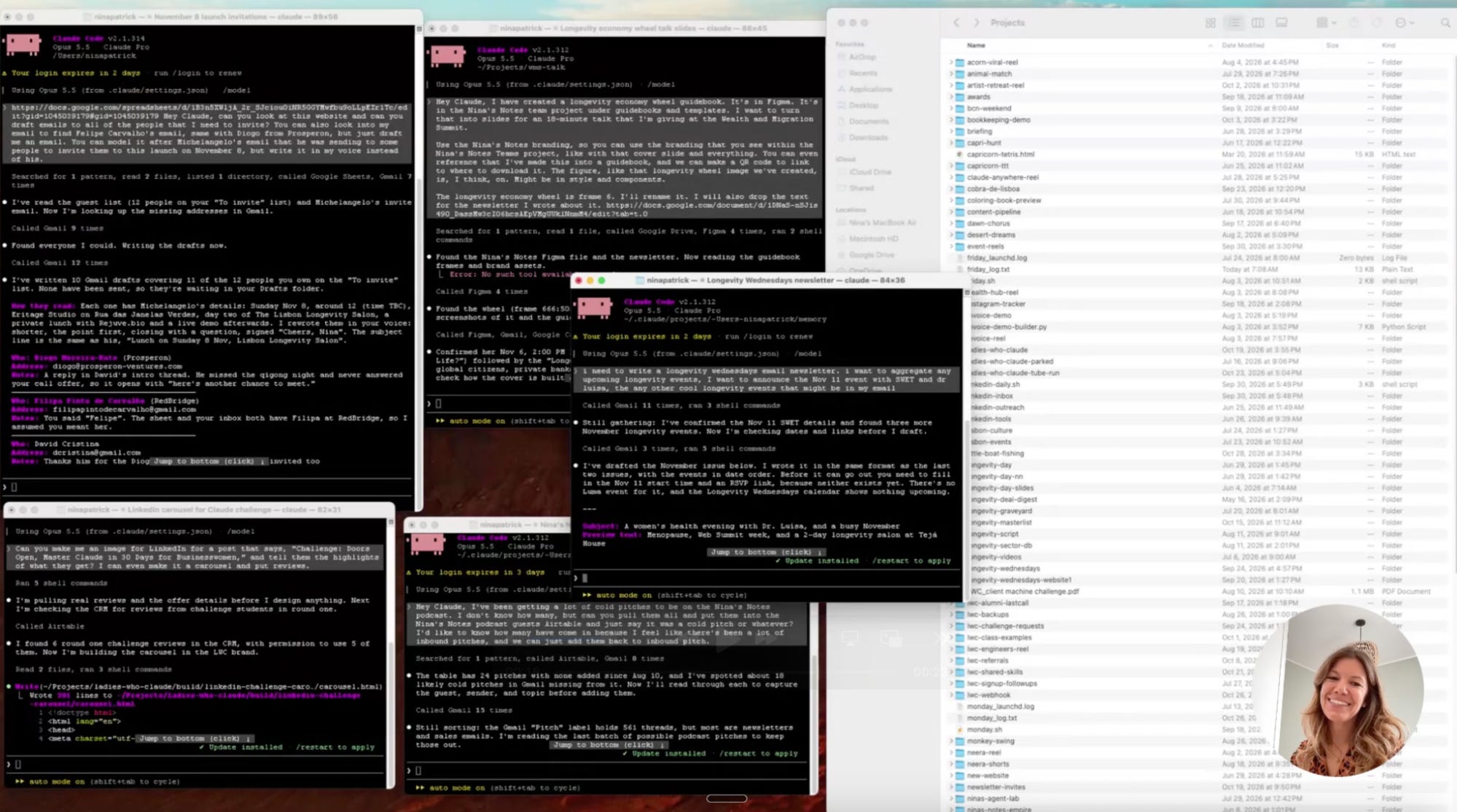
Here's what it adds up to:
→ 88 projects. Websites, an automatically updated and populated CRM, reels, a podcast-to-Shorts pipeline, and my bookkeeping automations just to name a few.
→ 13 skills I wrote myself. A skill is a shortcut. It’s a set of instructions that you teach Claude once and it can do the same task over and over, correctly. I type one word, like /invoice or /thumbnail, and Claude does the whole job the way I like it.
→ 4 agents. Little specialists. I made one that takes one of my podcast episodes and hands me back a Google Sheet of all the clips that I should make into YouTube Shorts, titles and all. Then I made the content producer agent to go in and do the cutting.
→ 10 jobs that run without me. A to-do email at 7:30 every morning. A scan of new longevity companies every Monday. A YouTube tracker every Friday. Bulk downloads of receipts at the end of every month. And a delegation audit that tells me what new things to delegate to AI.
→ 223 notes Claude keeps about me, so it remembers my business from one day to the next.
On top of all of that, I launched a whole new business, Ladies Who Claude, built on top of everything I’ve built and learned.
I would not have been able to build this company, let alone launch my 30-day Master Claude Challenge for Businesswomen (Pssshhh….new cohort starts Nov 16! Grab your spot!)
And I am still not a developer.
I want to share more about what I’ve built, and I’m going to use Nina’s Notes to do that.
This newsletter will teach you how to start using AI in life, work and health.
All you need is a paid Claude plan + the Claude desktop app + boring tasks you hate.
And a bit of time.
Carve our 2 hours this weekend to start experimenting with Claude.
Before starting, make sure:
You have 2 hours.
You share this with the friend who keeps saying "I really should learn AI." Everyone needs to learn how to do this. It's free, and it's how this newsletter grows.
Step 1. Give Claude a home.
The hardest part of this whole thing was day 1.
In April I told you to get over your terminal anxiety.
And while terminal is my favorite way to use Claude Code…the good news is that, you don't need to use the terminal.
→ Open the Claude desktop app and flip the toggle at the top of the left side column over to Code.
→ Select Local environment to “this computer” and make a new, empty folder. Call it whatever you want, I call mine “Projects”.
→ Pick that folder. That's where everything you build will live.
💡 Pro tip: one folder per project.
Save the project on your hard drive, not inside of Claude.
Save a copy on your Google Drive/iCloud Drive, OneDrive (wherever you back up your files).
Why?
Because that’s how we’ve been organizing our files all along. You don’t have to change.
Also this makes interoperability between tools like Claude and ChatGPT possible.
Now every project gets its own folder, all of my projects inside one folder called Projects.
88 folders later….I can still find anything.
And most importantly, Claude can find everything.
This folder’s primary home is on my hard drive, but I have copies in the cloud.
Now that Claude has a home, move on to step 2.
Every Tuesday at 6pm GMT, 1pm Eastern, 10am Pacific I get on live for an hour and show paid subscribers what I'm building with AI. Upgrade here.
Step 2. Teach Claude who you are.
In Nina’s Notes #177 I told you the best thing about Claude Code is that it remembers. Chat and Cowork can do that too, but Code can assess more files
In my mind, I like to think because it’s saving files on my hard drive and google drive, it has “unlimited memory” this is more or less true, it has the memory of my hard drive or google drive available to it. That is more than what is available in Projects in the desktop app.
Claude Projects in chat and Cowork have limited memory. I exceeded the memory in one project loading in only 50% of my Nina’s Notes library.
When I store the Nina’s notes library on Google Drive, or on my desktop - I don’t have those memory problems. I just point Claude Code to that folder and it can read the context. No memory limits to worry about.
So…let’s teach Claude about it and have it save it to its memory on your hard drive.
This is the step that makes that happen.
Paste this:
Interview me about my work, one question at a time. Ask about my business, my customers, the tools I use, the tasks I repeat every week, and how I like things written. When you're done, save everything you learned as memory notes so you remember it next time.
Claude now keeps 223 notes about me.
It knows my brand colors, that my email platform is MailerLite (not Mailchimp), and that an email never, ever goes out without me seeing it first.
It's like an assistant who actually took really good notes in every meeting.
But there's one problem...Claude still only does things when you ask. That's step 3.
This newsletter grows because people like you share it.
Step 3. Turn one boring task into a skill.
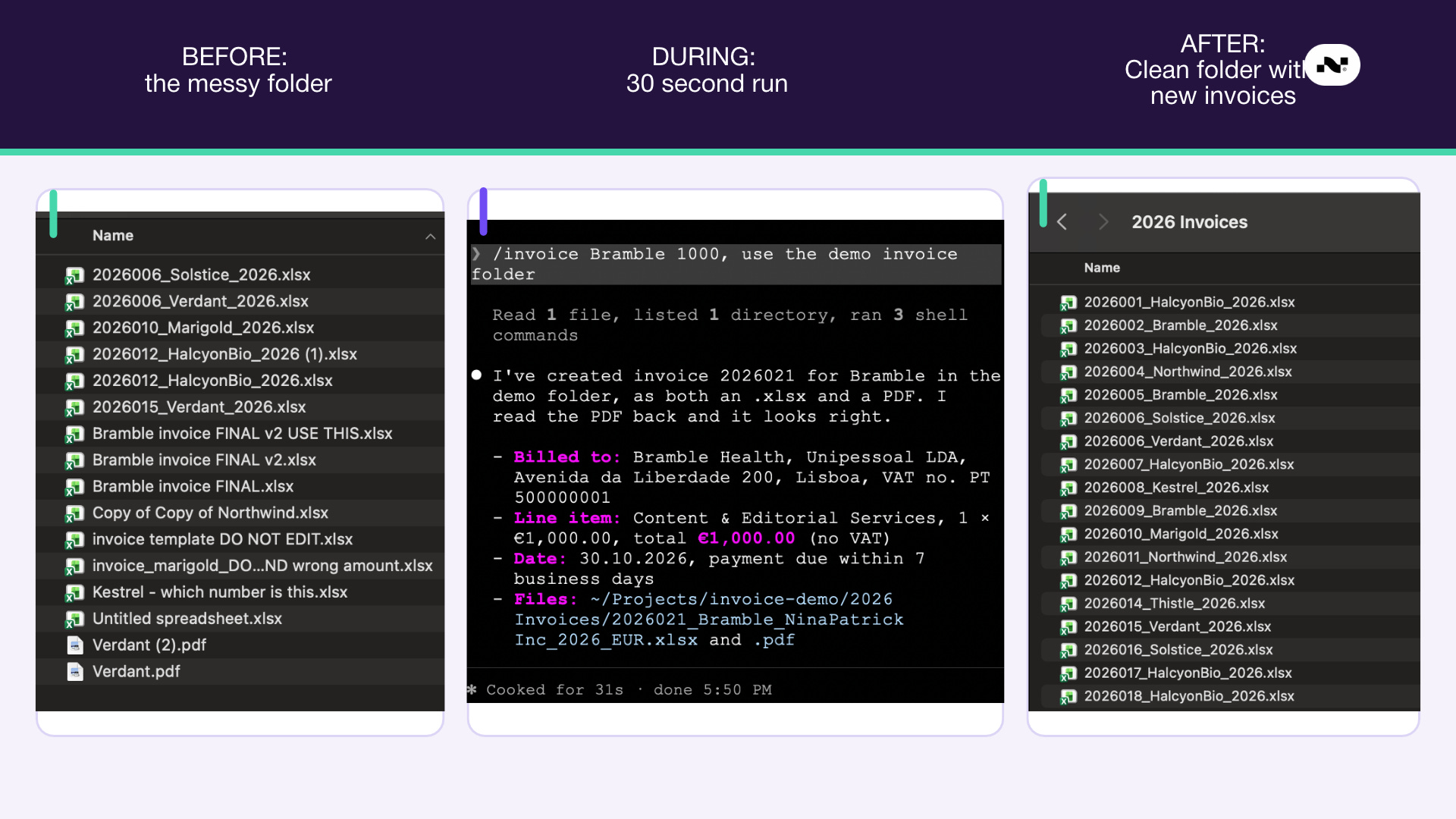
Pick the task you do every week and hate. For me it was invoices.
I'd manually make a copy of my last invoice, change the number, the client and the amount, and save it in the right folder. Every time for every client.
That’s something that can easily be automated.
So I made a skill.
Now I type /invoice, a name and an amount, and a small script that Claude wrote for me populates my invoice template and saves a .pdf for me, and even attaches it to the client email. Just a few seconds and it's done.
Want to build your first skill?
Paste this:
I do this task every week: [describe it, step by step in as much detail as possible]. Turn it into a skill. Ask me anything you need to know first. Then run it once with me so we can check it works.→ It writes the steps into a file that Claude reads every time you run it.
→ It asks what it needs instead of guessing.
→ If something breaks, tell it what went wrong, and it fixes the skill for next time.
Then, if it's something that should happen on its own:
Run this every [Monday at 8am] on its own, even when I'm not using Claude.That one line is how I get my to-do list in my inbox at 7:30 every morning.
Make sure to do a test run before trusting it will work on its own.
Then access the output - like it?
Keep it as is.
Not happy with it?
Tell Claude exactly what you want instead, and it will update the instructions.
In Nina’s Notes #177 I wrote that Claude Code was a gift to my ADHD.
I also wrote that it's a fine balance between AI helping my ADHD and making it worse...I said I would share my thoughts on that in another newsletter.
This is that newsletter.
How it helps my ADHD:
Now with AI, I can bring any idea I have into a quick prototype or a test. This is incredibly satisfying for my ADHD.
Idea to result in minutes….massive dopamine hit.
I have been able to launch digital products, launch my 30-day Challenge and launch a 3-day Intensive Workshop in Ibiza all because of Claude Code. Without AI, I would have slowed down, these projects may never have launched and the students never would have a chance to learn.
How it hurts my ADHD:
All those dopamine hits I get from starting new ideas…well, I feel I can do it again and again and again. Which leads to 5 terminal windows open simultaneously…all completing for working memory on my laptop. Just like those ideas competing for working memory in my brain. (ohhh the parallels)
This can mean that some projects are left unfinished or half-baked. But I still think it is a gift to be able to prototype an idea so quickly.
I can now quickly code up a simple game that I can end up playing for minutes…hours…days. Instead of doing “real” work. (ahhem…I did say that I made 12 tiny games. lol)
What I didn't expect through this whole journey with AI is that the part I love most is people learn what AI can do, then watch them build their own tools, dashboard, apps, games and automations.
Every Tuesday I get on live for an hour and show paid subscribers what I'm building with AI. Upgrade here.
Step 4. How to start.
Alright. That was a lot. Let's recap:
→ Make one folder, call it “Claude Projects” and open it in Claude Code.
→ Paste the interview prompt so Claude remembers you.
→ Turn your most boring weekly task into a skill.
→ Put it on a schedule, and let it run without you.
Claude Code is the first thing I open in the morning now, before my email.
You might already pay Claude $20 a month. But you probably use a small part of it if you’ve never flipped that toggle over to Claude Code.
And you didn’t know it was there, or how to use it mostly because nobody sat down and showed you how.
I’m here to do that.
I'm not paid by Anthropic. So I only show you what I actually use (and what still drives me crazy) and also sometimes when ChatGPT Codex is better than Claude (which happens but doesn’t stay that way for long).
Here's what paid subscribers get:
Build Hour, live every Tuesday at 6PM. Over 1 hour I share my screen and show you what I built that week, how I did it, and what broke. You bring your questions. It's recorded if you miss it.
Paid Members Community. Share what you’re building, get unstuck by people a few steps ahead of you, and see what everyone else is making.
The full write-up of every build. Steps, settings, and what I’d change, so you can copy it. Includes AI and health builds, made by someone with a pharmacology PhD.
All of it is in the paid subscription: $240 a year, or $20 a month. Less than $1 a day.
Upgrade today and save your seat for November 3rd's Build Hour:
The link to this week's Build Hour is below, for paid subscribers...
P.S. If you missed the first article I wrote about AI, here’s where it all started: #177, I’ve Been Using Claude Code for 25 Days.